Attendee Guide

The SXSW EDU Attendee Guide is your one-stop-shop to all things SXSW EDU with navigation tools and resources to help you prepare. Joining us this March? Start here and we'll see you soon!


Sign Up for Event Updates


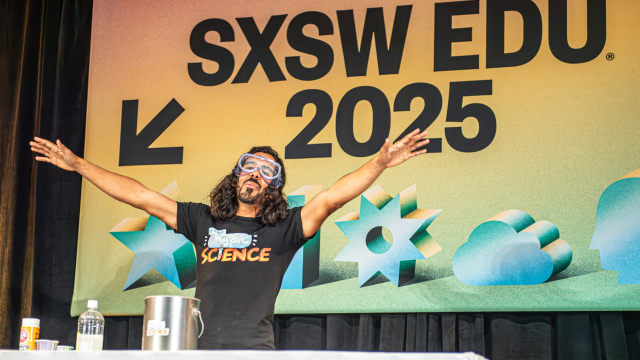
SXSW EDU 2025 - Photo by Tico Mendoza

SXSW EDU 2025 - Photo by Tico Mendoza

WELCOME SXSW EDU ATTENDEES


The Attendee Guide is your guide to SXSW EDU with a suite of navigation tools and resources to help prepare you for the adventure ahead.

Stay tuned for more SXSW EDU 2026 resources.

Stay Informed

To stay in the know, sign up for the email newsletter, check out the news feed for the latest programming features and announcements, and follow our social media channels on Bluesky, Facebook, Instagram, LinkedIn, TikTok, and YouTube.

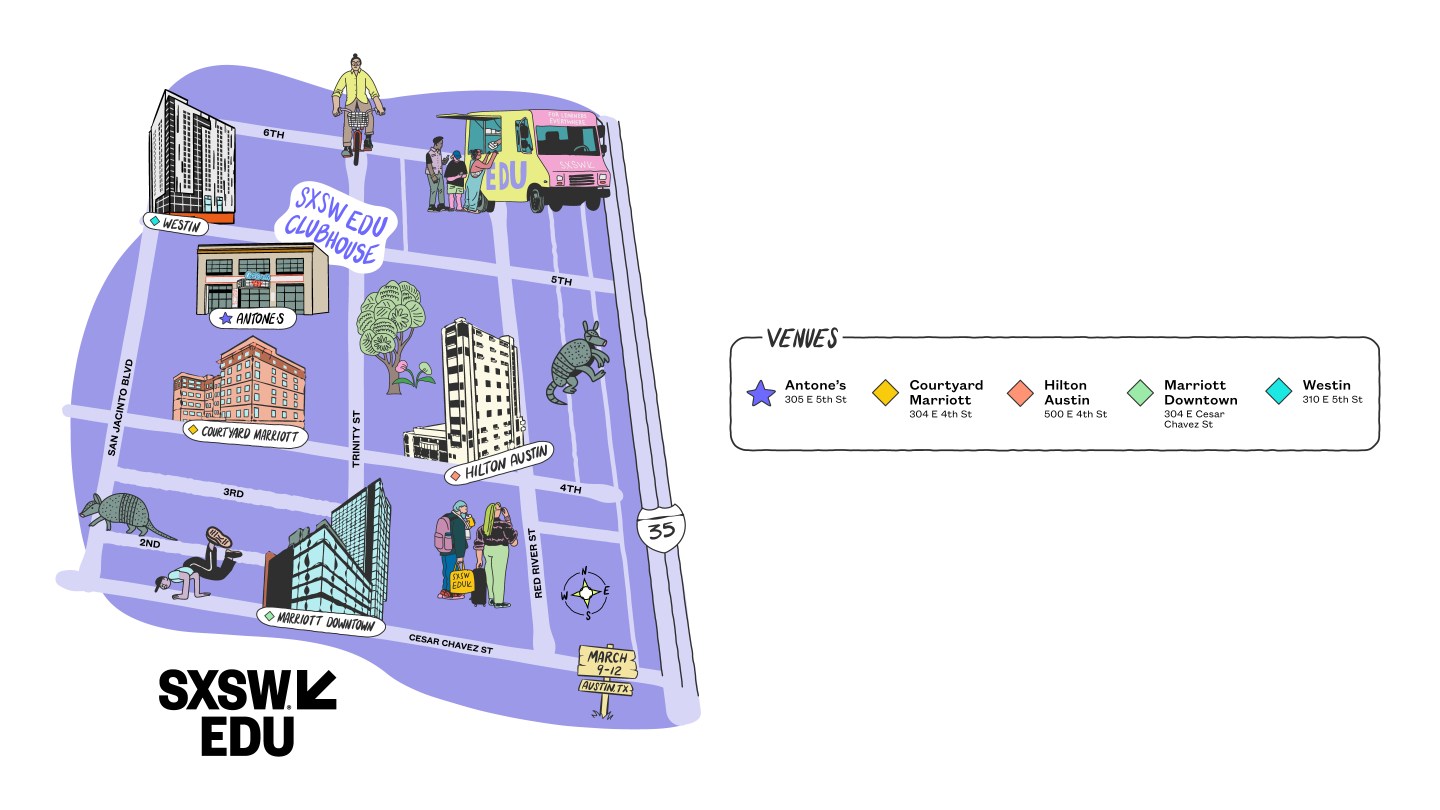
SXSW EDU 2026 VENUES

GOT YOUR BADGE? START HERE


1. Create Your Profile & Link Your Badge

After your SXSW EDU badge has been purchased, you will receive a registration confirmation email. Access your unique link code in your email or your Shopping Cart’s “Purchase History.” Sign into your SXSW ID account at id.sxsw.com and paste your link code. Detailed instructions can be found in our Registration FAQs.

After linking your credential, you can create your profile by adding a headshot, bio, and more in the “My Credentials” section of SXSW ID. Any information you add here to public fields will automatically be synced to the attendee directory in the SXSW EDU Schedule and SXSW EDU GO app where you can find other attendees — and they can find you too!

2. Book Your Hotel

Book your hotel room with SXSW EDU Housing, where you can access exclusive rates at the best downtown hotels closest to official SXSW EDU venues.

3. Build Your Schedule

The SXSW EDU Schedule is live! Customize your own list of must-see events and continue to browse as programming is added leading up to March.

Explore

3. Download the SXSW EDU GO App

SXSW EDU GO is the official mobile app for the annual SXSW EDU Conference & Festival. With SXSW EDU GO, you can build your schedule, sync your favorites, get event recommendations, network with other attendees, and more.

Available to download for iOS or Android.

RESERVATIONS


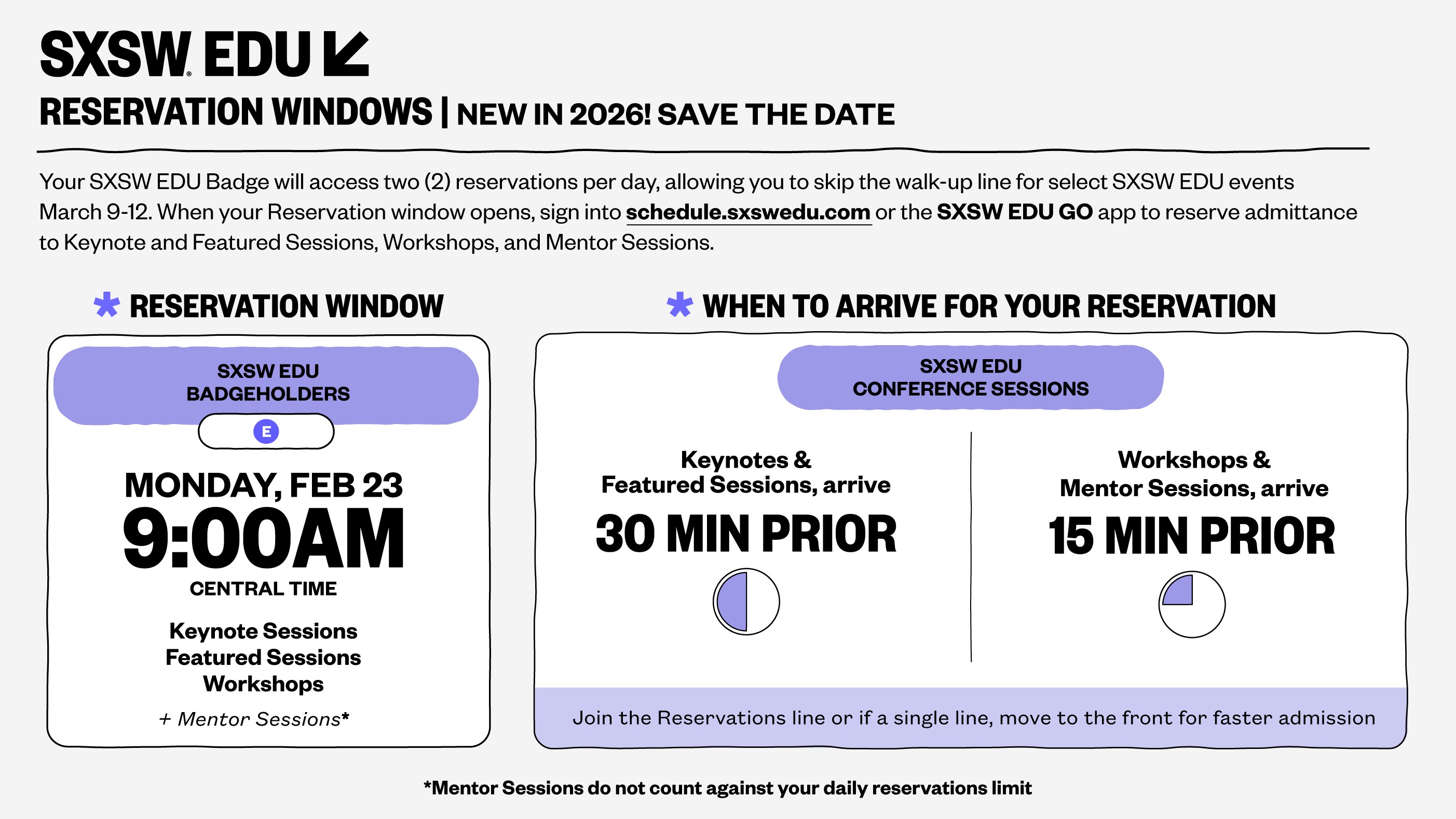
New for 2026, is Reservations. Your SXSW EDU Badge will access two (2) reservations** per day, allowing you to skip the walk-up line for select SXSW EDU events March 9-12.

Reserve your spot starting Monday, February 23 on a first-come, first-served basis for the following formats:

  • Keynote Sessions
  • Featured Sessions
  • Workshops
  • Mentor Sessions**

All of our sessions and events are available to badgeholders both with and without a reservation. Reservations are an added perk and only account for a portion of the room size. Reservations that are “full” do not mean that a session is at capacity. If you are not able to secure a Reservation in advance for an event, join the walk-up line.

**Mentor Sessions require Reservations but they will not count against your daily limit. If a Reservation for one of these sessions is full, we recommend arriving at the mentor room early to get on the walk-up list.

How to Book a Reservation

Reservations go live at 9am CT on Monday, February 23.

Before you can make Reservations:

  1. You must be a SXSW EDU registrant — purchase your badge here before February 23 to get first access to Reservations
  2. Once registered, you must log in and link your badge at SXSW ID using the Link Code found in your Registration Confirmation email
  3. Then, log in to the SXSW EDU Schedule or SXSW EDU GO app
  4. Browse Keynotes, Featured Sessions, Workshops, and Mentor Sessions — and select the “Reserve” button

SXSW EDU Reservations will open on Monday, February 23. Sign up for our newsletter and don’t miss it.

Frequently Asked Questions

I Secured My Reservation. What’s Next?
After securing your reservation, you will receive a confirmation email. To view all of your Reservations, go to the “My Reservations” tab in the SXSW EDU Schedule or SXSW EDU GO App. If you receive an error message or did not receive a confirmation email when requesting a Reservation, then your request was not successfully processed. You cannot claim reservations exceeding your daily limit, conflicting with another reserved event, or more than once for the same event. With a Reservation, we recommend you arrive at Keynote and Featured Sessions at least 30 minutes prior to the event start time. For Mentor Sessions and Workshops, we recommend you arrive 15 minutes prior. Look for the specified Reservations area when you arrive. This will either be at the front of the main line or in its own designated line next to the entrance for the session’s room. We will only hold your spot until 5 minutes after a conference session starts. After this, a Reservation cannot be honored. Be sure to have your SXSW EDU Badge when you arrive, as it is required for entry. Your badge will be scanned and confirms with the door staff that you have a reservation.
Do I Need a Reservation to Attend an Event?
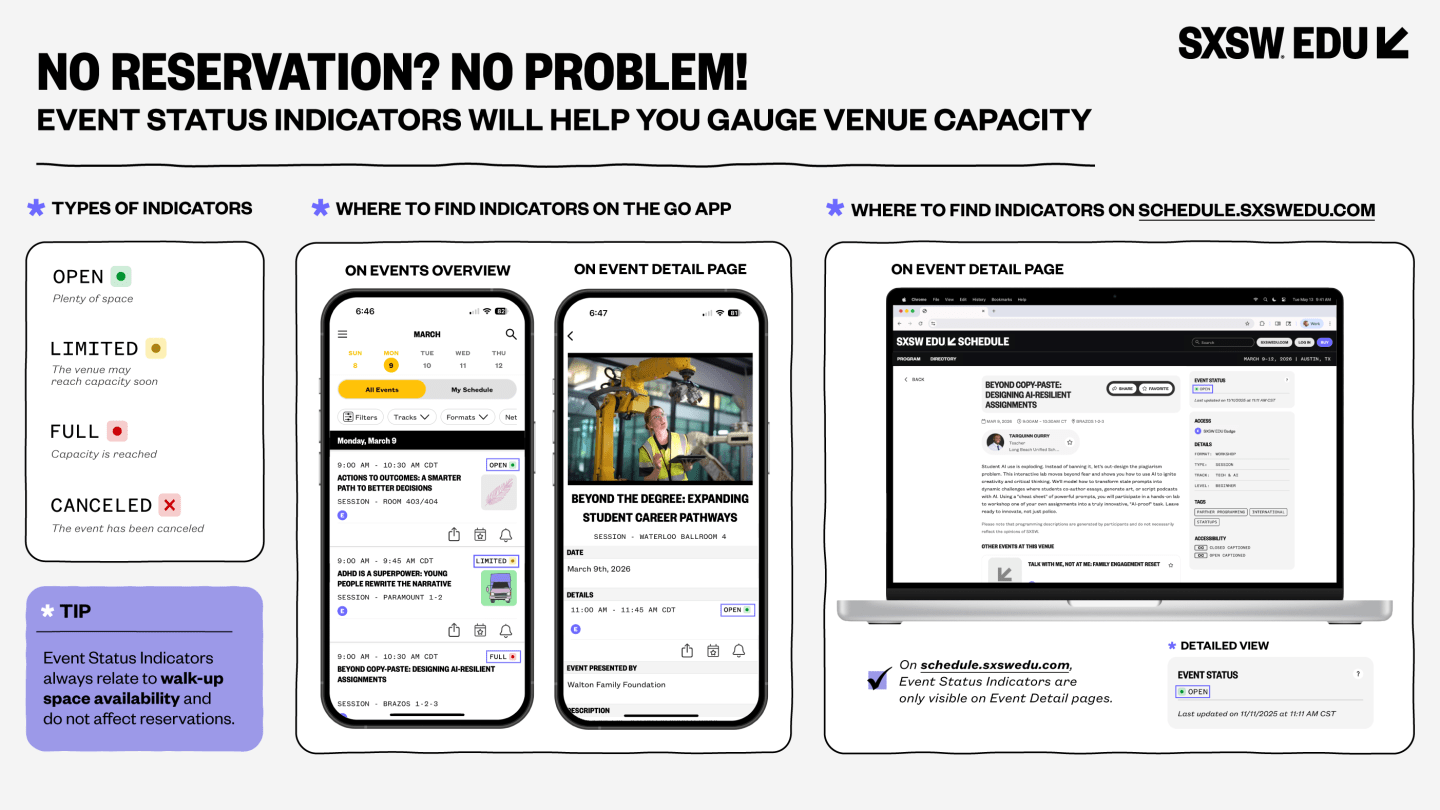
Didn’t get a reservation? No problem. All sessions are available to SXSW EDU badgeholders with and without Reservations. If you are not able to secure a Reservation for a session, you can still attend by joining the walk-up line. Please keep in mind that being in a walk-up line does not guarantee admittance to the session and are first come, first-served after Reservations. We recommend you check the event status in the SXSW EDU Schedule or SXSW EDU GO app to plan accordingly.
How Do I Access Daily Reservations?
Reservations are digital and available starting February 23 through the SXSW EDU Schedule or in SXSW EDU GO. Before you can make Reservations, you must log in and link your badge in SXSW EDU GO or SXSW ID, using the SXSW EDU Link Code found in your registration confirmation email. If an event has available Reservations, click the “Reserve” button. The Reservation has been accepted if the button says “Reserved” and you’ll receive a confirmation email as well. Not all events have Reservations, these events will be walk-up only.
The Session I Am Looking at Doesn’t Have a “Reserve” Button?
You are only able to request a reservation for Keynotes, Featured Sessions, Workshops, and One-on-One Mentor Sessions. Events that have reservations will have a “Reserve” button. If reservations are all taken for that session, this button will appear greyed out. If you have successfully reserved that session, this button will say “Reserved.”
  • Keynote and Featured Sessions: the request period will end when the limited number of reservations are claimed or at midnight of the day before the event, whichever comes first.
  • Mentor Sessions and Workshops: the request period will end when the limited number of reservations are claimed or at midnight of the day before the mentors and workshops, whichever comes first.
Can I Return or Exchange a Reservation?
If your plans have changed and you no longer need your Reservation, you can return the Reservation to make it available for another attendee. Returning an unused Reservation also allows you the opportunity to claim a Reservation for another event. Visit “My Reservations” on the Schedule or in the GO app to return your reservation. Click the “Return Reservation” button to return. Returns can happen before 12:01am on the day of the event. Please note: All returns are final – THIS ACTION IS FINAL AND CANNOT BE UNDONE. Once you return your Reservation, you can only reclaim it if the session has capacity. If you are having an issue claiming a reservation, please email us at info@sxswedu.com.

WALK-UP LINES

Our events are available to SXSW EDU badgeholders with and without Reservations. Reservations are venue-based and account for a portion of the room size, but they don’t indicate the venue is full. If you are not able to secure a Reservation for an event, just join your fellow badgeholders in the walk-up line.

I'VE ARRIVED! NOW WHAT?


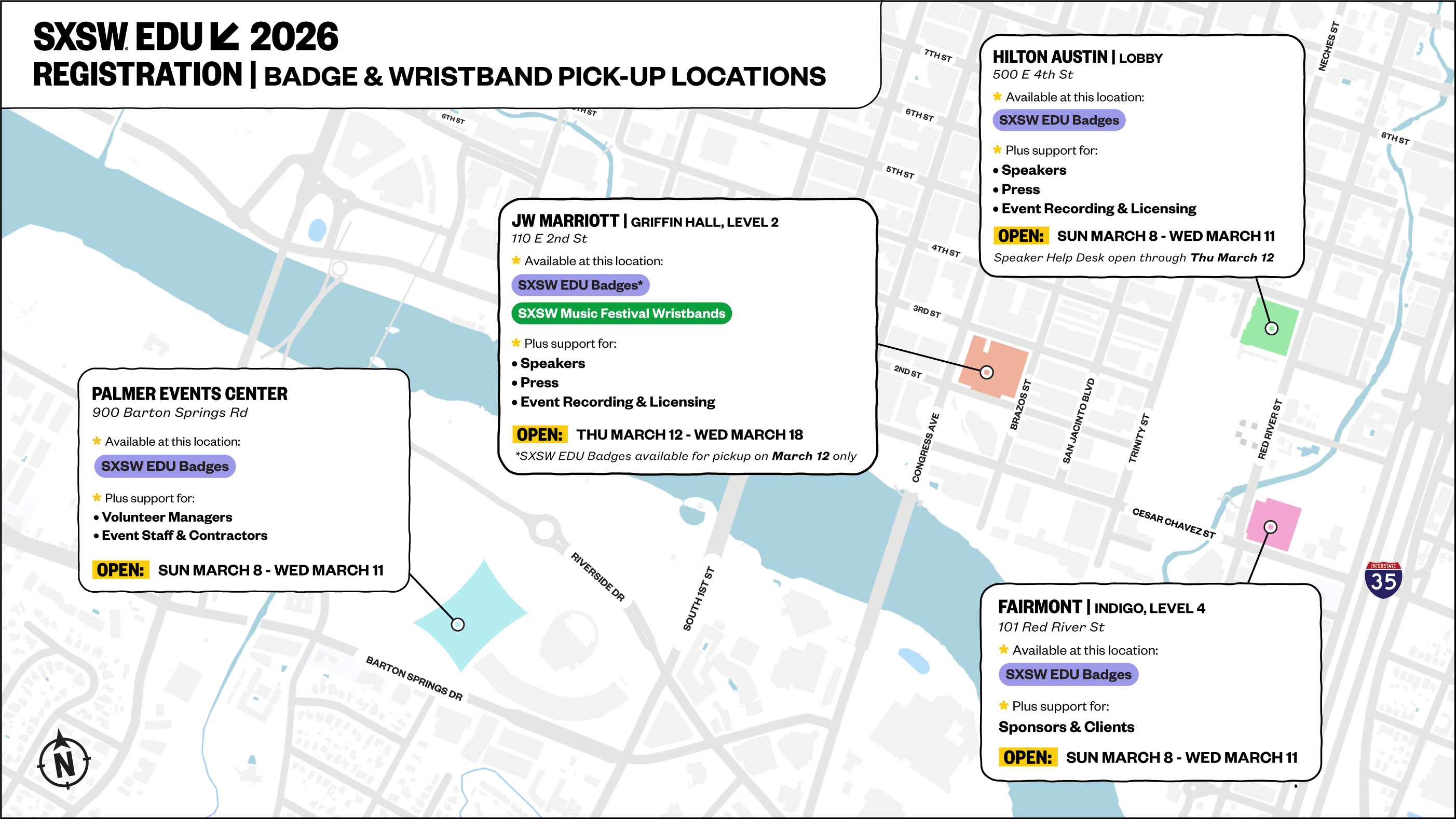
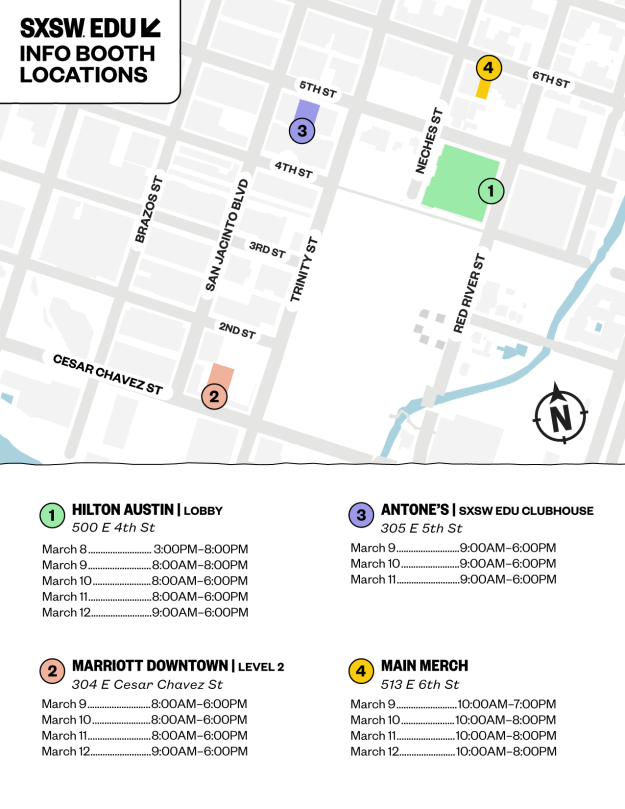
All badgeholders can pick up their badges at the following locations and hours during SXSW EDU. Please note that not every registration venue offers the same services, so please review what’s available at each location to best suit your needs!

Hilton Austin Lobby Hours
SXSW EDU badge pick-up and sales, Speaker Help Desk, Press Help Desk, Accessibility & Registration Help Desks, Event Recording & Licensing Desk
  • Sunday, March 8 |​ 4:00pm – 8:00pm
  • Monday, March 9 | 8:00am – 8:00pm
  • Tuesday, March 10 | ​8:00am – 6:00pm
  • Wednesday, March 11 | ​8:00am – 6:00pm
  • Thursday, March 12 | ​8:00am – 6:00pm (Speaker Help Desk Only)
Palmer Events Center Hours
All badge pick-up and sales, Accessibility & Registration Help Desks, Music Wristbands
  • Sunday, March 8 |​ 4:00pm – 8:00pm
  • Monday, March 9 | 8:00am – 8:00pm
  • Tuesday, March 10 | ​8:00am – 6:00pm
  • Wednesday, March 11 | ​8:00am – 6:00pm
Fairmont Indigo Room Hours
All badge pick-up and sales, Accessibility & Registration Help Desks, Sponsor & Client Help Desk
  • Sunday, March 8 |​ 4:00pm – 8:00pm
  • Monday, March 9 | 8:00am – 8:00pm
  • Tuesday, March 10 | ​8:00am – 6:00pm
  • Wednesday, March 11 | ​8:00am – 8:00pm

All times are in Central Time (CT). Dates, times, and locations subject to change. To pick up your SXSW EDU Badge, you must present a government-issued ID. To expedite the badge pickup process, upload your photo to id.sxsw.com ahead of time.

For more information on getting to the heart of SXSW EDU from wherever you are staying in Austin, browse the Getting Around page for a comprehensive list of transportation services and other resources.

HOTEL & TRAVEL ARRANGEMENTS


SXSW EDU Housing is here to help! Email the local team of travel professionals at housing@sxswedu.com or call 512-467-7979.

If You Haven't Booked Your Hotel

Many of our favorite SXSW EDU hotels are still available. Book today while supplies last!

SXSW EDU Housing offers a wide selection of Austin hotels at the best available rates during SXSW EDU. Our local team of travel professionals is your guide for getting the lowest rates, expert hotel advice, and making your stay in Austin comfortable during SXSW EDU 2026.

If You Have Booked Your Hotel

  • Know your method of payment before your arrival. If you aren’t traveling with the credit card you intend to use to pay for your room, complete a Credit Card Authorization form and submit it to your hotel. Review our reservation policies for important cancellation deadlines and payment information.
  • Update your reservation online. Make changes to your reservation online using the Request for Change link at the bottom of your reservation confirmation or from the Shopping Cart where your badge was purchased.

Reservation Policies | Housing & Travel FAQs

SXSW EDU CLUBHOUSE


New for 2026, SXSW EDU Clubhouse taking place at the historic Antone’s from Monday, March 9 through Wednesday, March 11. Antone's will serve as a dynamic, central hub you simply can't miss. Experience daily performances, Keynote livestreams, social events every night, and more.

KEYNOTE & FEATURED SESSION LIVE STREAM


During the week, SXSW EDU carries our Keynote and Featured Sessions live streaming on SXSW EDU's YouTube Channel. If you’re unable to attend in-person, watch from your laptop, mobile device, or watch with other badgeholders at the SXSW EDU Clubhouse at Antone's.

LOST AND FOUND


Misplace something important? We have a Lost and Found. Search before you go! Hyatt Place, Meeting Room 1 Hours: 3/9-3/18, 8am-5pm.

ATTENDEE SERVICES


Family Room

Stay tuned for more information on the Family Room. The Family Room is available for parents and families needing a place to care for children, change diapers, or have a quiet space to get away. Breastfeeding mothers can find privacy in a screened-off area within the Family Room with fridges available.

Sensory Room

Stay tuned for more information on the Sensory Room. The Sensory Room is a calm, quiet space where attendees can take a break from the noise, lights, and crowds designed to help people who might feel overwhelmed by providing a peaceful environment and the chance to recharge during the event.

MORE RESOURCES


Attendee Safety

Safety is a top priority for SXSW EDU. We work closely with local, state, and federal agencies year-round to plan for a safe event.

Please review SXSW EDU Attendee Safety Resources for a list of general safety resources including emergency and non-emergency contact information, bag policies, code of conduct, Austin street closures, and more.

ATTENDEE SAFETY

Accessibility

SXSW EDU provides reasonable accommodations to make our events accessible for all attendees and participants. Explore the SXSW EDU Accessibility page for more information.

ACCESSIBILITY

Code of Conduct

SXSW EDU is not a place for behavior that is inappropriate, off-topic, disruptive, abusive, or illegal. Review the SXSW Code of Conduct and report any inappropriate behavior by emailing conduct@sxsw.com.

CODE OF CONDUCT

Support

  • For more general questions about SXSW EDU, start with the SXSW EDU FAQs.
  • For help purchasing registrations, redeeming coupons, and customer service, email reg@sxswedu.com.
  • For help with general information and questions about SXSW EDU, email info@sxswedu.com.